
I check training rules, storage limits, and submission rights before sending a draft to a rewrite API. “Not used for training” does not mean “not stored”: UnslopAI’s stated policy allows encrypted storage of drafts and rewrites for up to 48 hours.
Here’s what I check before sending:
- Route and terms: Which rules cover my API, web app, or MCP connection, and who receives the text?
- Training and review: Can account settings or feedback permissions allow someone to read it?
- Storage and deletion: What stays in logs, backups, or third-party systems after deletion?
- Permission and redaction: Am I allowed to submit the draft, and have I removed details the rewrite doesn’t need?
I save dated policy copies and record my send-or-pause decision. If a handling rule is unclear, I pause - and check again when the terms, settings, or access route change.
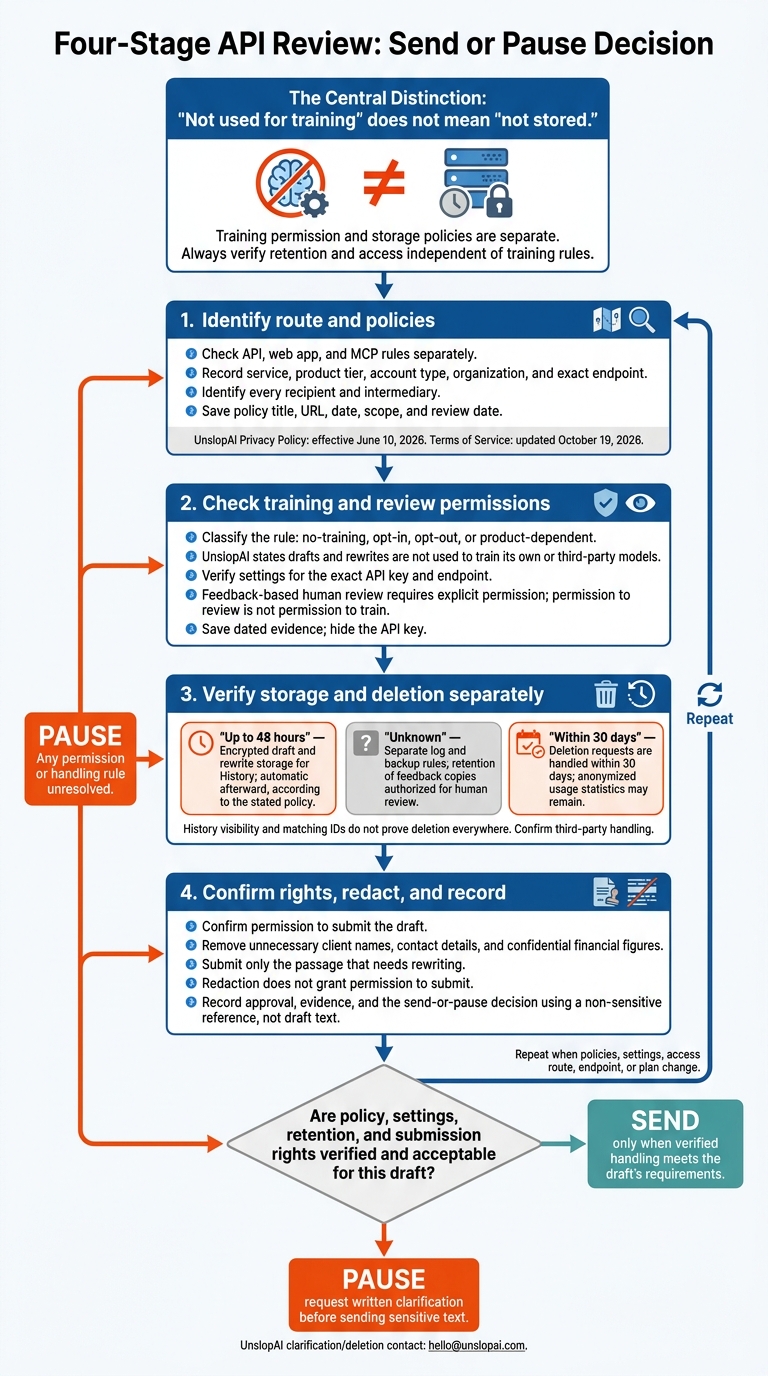
STOP Sharing Your Data With AI Until You Know This
1. Identify the Access Route and Policies
Pin down the exact access route and policies that apply to your draft. In your review notes, record the service, product tier, account type, organization, and exact endpoint.
Check API, Web App, and MCP Rules Separately
Match your draft’s access route to the policy that governs it. Use the table below to distinguish policy scope from account controls and confirm which rules apply before you submit.[1][2][3][4]
| Access route | Receiving services | Applicable policy | Account controls | Open questions |
|---|---|---|---|---|
| Web app | Provider + storage + model vendor | Privacy Policy; Terms of Service | Browser session; History dashboard | Any account-specific terms? |
| API | Provider + storage + model vendor | Privacy Policy; API Reference; Terms of Service | API key | Any additional recipients through your integration? |
| MCP server | Provider + host tool + storage + model vendor | Privacy Policy; Terms of Service; host-tool terms | Subscription; connection settings | What are the host’s workspace-level retention rules? |
Record Policy Dates and Scope
For each document, save its title, URL, date, and scope, along with your review date.
UnslopAI’s Privacy Policy is effective June 10, 2026; its Terms of Service were updated October 19, 2026.[1][2] The privacy policy also notes EU/EEA rights; record that scope if applicable.[1]
Check that each document covers your account and endpoint. Also review any agreement your organization has accepted.
If coverage or recipient details are unclear, request written clarification at [email protected] before sending sensitive text.[3]
Next, check the default training and sharing settings.
2. Check Training Defaults and Settings
Once you’ve confirmed which policy applies, check whether the provider trains on your content - and whether account settings change that default.
Read the Training and Sharing Rules
Read the policy language on training, model improvement, feedback, and customer content. Classify the API’s rule as no-training, opt-in, opt-out, or product-dependent.
UnslopAI says it does not use submitted drafts or resulting rewrites to train its own or third-party models. It may retain anonymous usage metadata for quotas and service improvement.[1][2] Flag any gaps in how the policy covers prompts, outputs, and moderation logs.
Human review based on feedback requires explicit permission. That permission is not permission to train.[1] Verify which rule applies to the exact API key and endpoint you’ll use.
Check Settings for the API Key and Endpoint
Open the API settings page and confirm the key used for POST https://unslopai.com/api/v1/rewrite.[3] Check whether saved account settings change training or review permissions for API requests.
For example,
preserve_markdowncan inherit the saved account preference when omitted, but that affects formatting only.[3]
Save a dated screenshot of the relevant API and settings pages, with the key hidden.
Record quota and usage fields for your audit, too. These fields do not show how prompts are stored or used.[3]
Resolve Gaps in Training Permissions
Document the no-training policy, whether feedback-based review is enabled, and whether the documentation clearly covers the content you plan to send.
If anything is unclear, email [email protected] for written confirmation before submitting the draft.[1][2] Hold sensitive drafts until the policy explicitly covers prompts, outputs, review, and logging.
3. Check Retention, Human Review, and Deletion
Check how long content stays available, who can read it, and how deletion works. Treat storage limits, human review, and deletion as separate checks.
Record Each Data-Handling Rule
Use the policy pages linked on the website. Save the policy text and the date you reviewed it alongside your findings. Mark anything the policy doesn't explain as unknown, then check whether copies remain outside the main content store.
| Category | What to verify | Evidence to record |
|---|---|---|
| Draft and output storage | Retention period, storage protection, and purpose. | Drafts and rewrites are encrypted and stored for no more than 48 hours so users can revisit them in History. They're then deleted automatically. [1][2] |
| Logs and backups | Whether copies remain after the 48-hour window. | The documentation says text is deleted automatically after 48 hours and only anonymous metadata remains. Separate log and backup rules are unknown. [1] |
| Human review | Whether permission creates a retained copy. | Human review is opt-in only. It happens when feedback is submitted and allow the team to read this is selected. That copy's retention period is unknown. [1] |
| Customer-controlled deletion | Request method, response window, and deletion scope. | Email [email protected] to request deletion. Requests are handled within 30 days. Account deletion removes personal data; anonymized usage stats may remain for quotas and service improvement. [1] |
Check History Limits and Storage Exceptions
An API response's id matches the rewrite ID in the web app's History, where the content stays accessible for 48 hours. [3] But matching IDs and History visibility don't prove deletion everywhere.
Ask whether the same 48-hour limit applies to the rewrite endpoint, other workflows, logs, backups, and third-party processors. If any rule remains unknown, keep the draft redacted until that rule is confirmed.
Once retention and deletion are clear, redact anything the rewrite doesn't need.
4. Redact the Draft and Decide Whether to Send
After the policy review, redact the draft before sending it through the API.
Remove Sensitive Details You Do Not Need
Remove client names, contact details, and confidential financial figures that aren't needed. Keep enough surrounding text to preserve the meaning, and submit only the passage that needs rewriting.
Set clear controls for the API rewrite:
- Preserve: facts, claims, and required formatting
- Change: tone, pacing, and length
- Avoid: jargon and repeated patterns to ensure the text doesn't look like AI writing
- Prioritize: meaning over polish
Redaction does not grant permission to submit the text. [2]
Record the Send-or-Pause Decision
After redacting, decide whether to send or pause based on the checks above. Send only when policy, settings, retention, and sharing rights meet the draft’s confidentiality rules.
Use a non-sensitive reference, such as the result_id, rather than copying draft text into your review record. [4] Record the decision before the 48-hour deletion window closes. [1][2]
If the rewrite triggers a fidelity warning about names, numbers, dates, or factual claims, route it to a human reviewer before finalizing it.
Pause if any permission or handling rule remains unresolved. Send only after the issue is cleared.
Conclusion: Use the Before-Sending Checklist
Before sending a draft, confirm the policy, retention rules, and approval. Copy this checklist into your review record and complete every item before submission:
- [ ] Service and route: Record UnslopAI, the access route (API, web app, or MCP), plan level, and account type. API and MCP require Pro. [3][4]
- [ ] Recipients: List every intermediary that receives the draft or metadata, including payment and email processors. [1]
- [ ] Endpoint: For API submissions, confirm
https://unslopai.com/api/v1/rewrite. [3] - [ ] Policy copies: Save the Privacy Policy and Terms, along with your review date and notes. [1][2]
- [ ] Training and sharing: Verify no-training status. Record any permissions for feedback sharing or human review. [1][2]
- [ ] Retention and deletion: Confirm the 48-hour deletion window, which metadata remains, and how the 30-day access/deletion process works. [1]
- [ ] Approval and send decision: Record redaction status, who owns submission approval, and the final send/pause decision.
Send only when verified handling meets the draft’s requirements. If it doesn’t, redact further if that resolves the issue. Otherwise, pause.
Repeat the review whenever a policy, endpoint, or plan changes.
FAQs
What if my contract conflicts with UnslopAI’s published policy?
Resolve any conflicts between your organization’s contract or confidentiality policy and UnslopAI’s published terms before submitting text.
UnslopAI states that it does not use submitted content for model training. It also says drafts and rewrites are encrypted and automatically deleted from storage within 48 hours [1][2][3].
Before using the API or web app, check your internal privacy and security rules to confirm they allow third-party processing under these terms [4][1].
How can I verify deletion beyond History?
UnslopAI automatically deletes submitted drafts and their rewrites from storage within 48 hours. You don’t need to take any action [1][2][3]. Deleting your account also removes the personal data linked to it, though anonymized usage statistics may be kept [1].
For data-rights concerns or deletion requests, email [email protected]. Deletion requests are handled within 30 days [1].
Who should approve confidential drafts before submission?
Before submitting confidential drafts through the rewrite API, the author or a designated reviewer should check the before-and-after diff and any fidelity warnings, then approve the drafts. Pay close attention to changes in names, numbers, dates, and factual claims. Treat the rewrite as a proposed revision, and finalize it only after human approval [1][2].