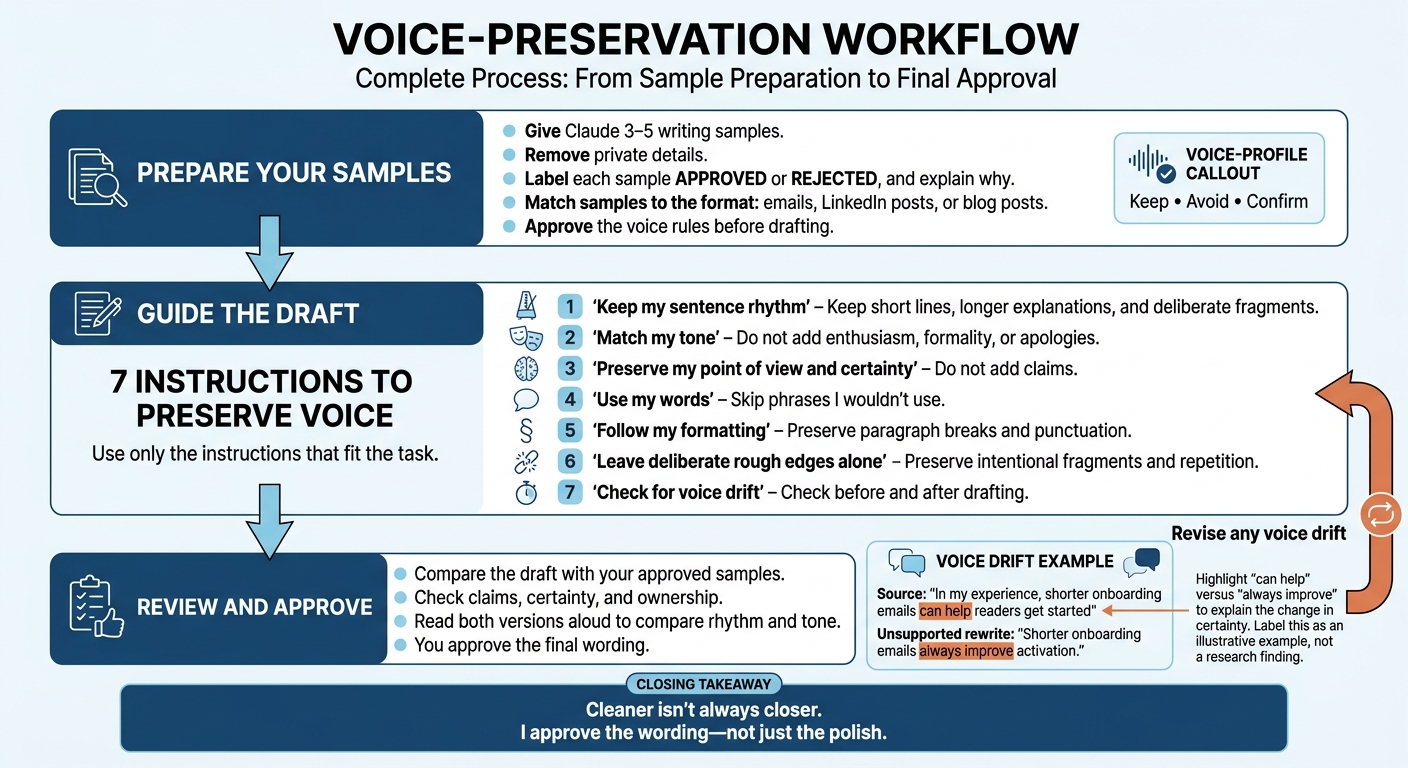
I give Claude 3–5 writing samples before asking it to sound like me. I remove private details, label what to copy or avoid, and approve its voice rules before it drafts.
Then I use seven instructions to keep my writing from turning generic (or easy to spot as AI):
- Keep my sentence rhythm, including short lines and longer explanations.
- Match my tone without adding enthusiasm, formality, or apologies.
- Preserve my point of view and certainty without adding claims.
- Use my words and skip phrases I wouldn’t use.
- Follow my formatting, from paragraph breaks to punctuation.
- Leave deliberate rough edges alone, including fragments and repetition.
- Check for voice drift before and after drafting.
My final check: compare the draft with my samples. Cleaner isn’t always closer. I approve the wording - not just the polish.
Claude can learn to write like you. Here's the setting
Start With Your Writing Samples
Choose samples that sound like you today - not your most formal or experimental work. You’re showing Claude how you write, not just what you write about. Include enough samples to show your usual voice and how it changes by format. Use emails for email drafts, LinkedIn posts for LinkedIn content, and blog posts for articles. Mix up the topics so Claude doesn’t mistake a repeated subject for a style rule.
Label each sample APPROVED or REJECTED, and explain why. Point out intentional fragments, blunt wording, or unusual punctuation you want to keep. Remove client names, private links, account numbers, and confidential details, but leave greetings, contractions, line breaks, and sentence structure intact. Rejected samples should show Claude what to avoid - not give it another style to copy.
Before Claude drafts anything, use this prompt to map your writing patterns:
Study the writing samples below before drafting.
First, identify recurring patterns in:
- sentence length and rhythm
- vocabulary and level of jargon
- openings and closings
- paragraph length
- punctuation
- transitions
- humor and emotional intensity
- point of view and certainty
Quote brief excerpts from the samples as evidence. Separate recurring habits from one-off choices, and label each observation recurring, occasional, or uncertain.
Treat the APPROVED samples as models to preserve. Treat the REJECTED samples as examples of what not to repeat. If the samples conflict, flag the conflict and ask which preference should take priority.
End with a concise voice profile and a checklist of “keep,” “avoid,” and “confirm” rules. Wait for my approval before writing.
Once Claude has your samples, use the next instruction to preserve sentence rhythm.
1. Keep Your Sentence Rhythm
Paste-Ready Instruction
Match my sentence rhythm. Keep short sentences for emphasis and longer ones for explanation. Do not make every sentence the same length or smooth out deliberate fragments.
Why It Matters
Sentence length sets the pace. Short lines add emphasis. Longer sentences give you room to explain. Make them all the same length, and the draft loses the rhythm that makes it sound like you.
Three Short Examples
Email:
Quick update. We need one more day because the final numbers arrived late, and I want to verify them before I send the report.
The fragment gets straight to the update.
LinkedIn:
Quick thought. Short sentences add force. Longer ones carry the explanation.
Blog draft:
A short sentence hits hard. A longer one gives the idea room to land.
Voice-Drift Check
Compare Claude’s opening with the original: does “Quick update.” still stand alone? Read both versions aloud. If Claude lengthens the opening or splits the explanation into small pieces, ask it to bring back the original rhythm.
Once the rhythm matches, move to tone and emotional intensity.
2. Match Your Tone and Emotional Intensity
After rhythm, keep the feeling behind the words intact.
Paste-Ready Instruction
Use my tone: direct, warm, and confident. Do not make it more enthusiastic, formal, apologetic, or polished than my sample. Keep the emotional intensity at the same level.
Why It Matters
Let your samples set the tone, rather than a preset label. Use labels like “professional” only when your samples support them. Point Claude to specific phrases that show the warmth, confidence, or restraint you want.
Hypothetical LinkedIn Example
I tried fewer meetings this month. So far, I’m getting more uninterrupted work done
Keep this as a quiet progress update. Don’t turn it into a big announcement or a broad lesson about meetings.
Voice-Drift Check
Compare the emotional level before and after editing. Cut added enthusiasm, apologies, or stiffness so the observation stays personal and restrained.
Once the tone stays intact, lock in your point of view and level of certainty.
3. Keep Your Point of View and Level of Certainty
Paste-Ready Instruction
Write from my point of view. Preserve my pronouns and level of certainty. Do not add claims, experiences, motivations, or conclusions that are not in my source material.
What It Protects
Keep the source’s pronouns and framing. Qualifiers like can and in my experience matter: they set the limits of your claim.
Hypothetical Blog Example
Keep the source wording:
In my experience, shorter onboarding emails can help readers get started
Don’t replace it with:
Shorter onboarding emails always improve activation.
Voice-Drift Check
Check that the rewrite keeps your level of certainty, not just your pronouns. Changing “can help” to “always improve” turns a possibility into a guarantee. Compare each claim with the source and remove any certainty the source doesn’t support.
Once the claim level matches, move to word choice.
4. Use Your Words and Avoid Unwanted Phrases
Once the claim level matches, pin down the wording.
Paste-Ready Instruction
Use my vocabulary and phrasing. Prefer plain words over polished alternatives. Avoid this list: [insert list]. Do not add jargon, clichés, corporate language, or motivational filler.
What It Protects
Word choice should match your samples, just like rhythm, tone, and certainty. Use [insert list] for words and phrases you never use. Add preferred replacements, too: “use” instead of “utilize” and “We’ll” instead of “We will,” when they fit your samples.
Here’s how that looks in an email.
Hypothetical Email Example
Direct: Can you send the draft by Friday?
Avoid: Please leverage this opportunity to expedite delivery.
Voice-Drift Check
Search Claude’s draft for banned phrases, added jargon, clichés, and motivational filler. Keep technical terms the draft needs. Remove only wording that makes it sound generic.
5. Match Your Paragraphs and Formatting
Voice comes through in structure, not just word choice.
Paste-Ready Instruction
Match my paragraph length and formatting. Preserve my bullets, em dashes, contractions, headings, and line breaks. Preserve variation when my samples vary. Do not force a generic template.
What It Protects
Formatting is part of voice. Paragraph length, spacing, and punctuation shape how your writing sounds.
Example
Follow the same breaks and visual pattern as your samples.
What Changed
We cut the agenda in half. The discussion got better.
I’m keeping that change.
Voice-Drift Check
Check that Claude keeps the first two sentences together and the last sentence in its own paragraph. It shouldn’t merge the paragraphs or place every sentence on a separate line. Compare its bullets, headings, and deliberate line breaks with your samples, too.
6. Keep Deliberate Fragments and Rough Edges
Once rhythm, tone, and word choice are set, keep the rough edges that make the writing sound like you.
Paste-Ready Instruction
Make minimal edits. Preserve deliberate fragments, repetition, abrupt transitions, unusual word choices, and uneven sentence patterns from my approved samples. Use rejected samples to spot edits that erase intentional roughness. Fix only errors that obstruct meaning. If intent is unclear, flag it instead of rewriting.
What It Protects
Not every rough edge needs fixing. A fragment can add emphasis. Repetition can help a point stick.
Hypothetical Blog Example
Give Claude this approved-and-rejected pair:
Approved: Anyway. Back to the part that didn’t work.
Rejected: Let us now examine the challenges.
Voice-Drift Check
Ask why a rough passage changed: was its meaning unclear, or was it just less polished?
7. Check Your Voice Before and After Drafting
Paste-Ready Instruction
Before revising, list the voice rules you will follow. After drafting, check rhythm, tone, point of view, word choice, formatting, and unsupported claims. Flag any sentence that sounds more polished, certain, or generic than my samples.
What It Protects
A voice check catches changes that polished wording can hide. A smoother sentence can still promise more than you’re willing to deliver.
Hypothetical Email Review
For every draft, ask Claude to show what stayed intact and what changed.
Preserved: your brief opening, “Quick update.”
Possible drift: “I’m certain we’ll finish Friday” replaces your qualified “We’re aiming for Friday.”
Voice-Drift Check
Restore the qualified deadline before accepting the draft. Then compare the revision line by line for changes in claims, certainty, and ownership. Read it aloud alongside your samples to catch shifts in rhythm and tone.
Conclusion: Compare the Draft With Your Samples
After applying the seven instructions above, do one last side-by-side review. Give Claude your writing samples and approve the voice rules it extracts before requesting a draft. Use only the instructions that fit the task. An email, LinkedIn post, and blog draft don’t need the same pacing or formatting.
Compare the draft with your approved samples. Cleaner prose doesn’t always sound more like you. Keep the wording that matches your voice and revise what doesn’t.
If the draft still feels too polished, UnslopAI can flag robotic phrasing and fidelity issues before you publish.
Treat those checks as review aids - not final approval. Keep changes that improve clarity, and restore wording that sounds more like you. Claude handles the draft; you approve the final version.
FAQs
Can I reuse my voice profile across Claude chats?
Yes. Include your voice profile in every request because the server doesn’t retain it between separate sessions. Save a short brief with your preferred sentence length, level of formality, vocabulary, and specific phrasing. Then paste it into each prompt.
To simplify the workflow, use the UnslopAI MCP server to bring those voice constraints into your AI tools while keeping your draft’s intended meaning and style.
How do I adapt my voice for different audiences?
Build a reusable voice profile from your past writing. Note your rhythm, vocabulary, and sentence length. Before each draft, define your audience and the tone you want. Then adjust the formality and sentence structure without changing your core point of view.
Use UnslopAI’s before-and-after diffs and fidelity checks to review edits without losing meaning. Keep your specific word choices, check that claims are accurate, and read the draft aloud to make sure it sounds like you.
What if Claude still sounds generic?
Edit the draft instead of regenerating it. Cut filler, replace vague wording with specific names, numbers, and dates, and vary sentence length. State your judgment rather than just summarizing.
UnslopAI can flag repetitive patterns and generic structure while preserving your meaning, names, and facts. Always check the before-and-after diffs: the edits should keep your voice and stance intact.