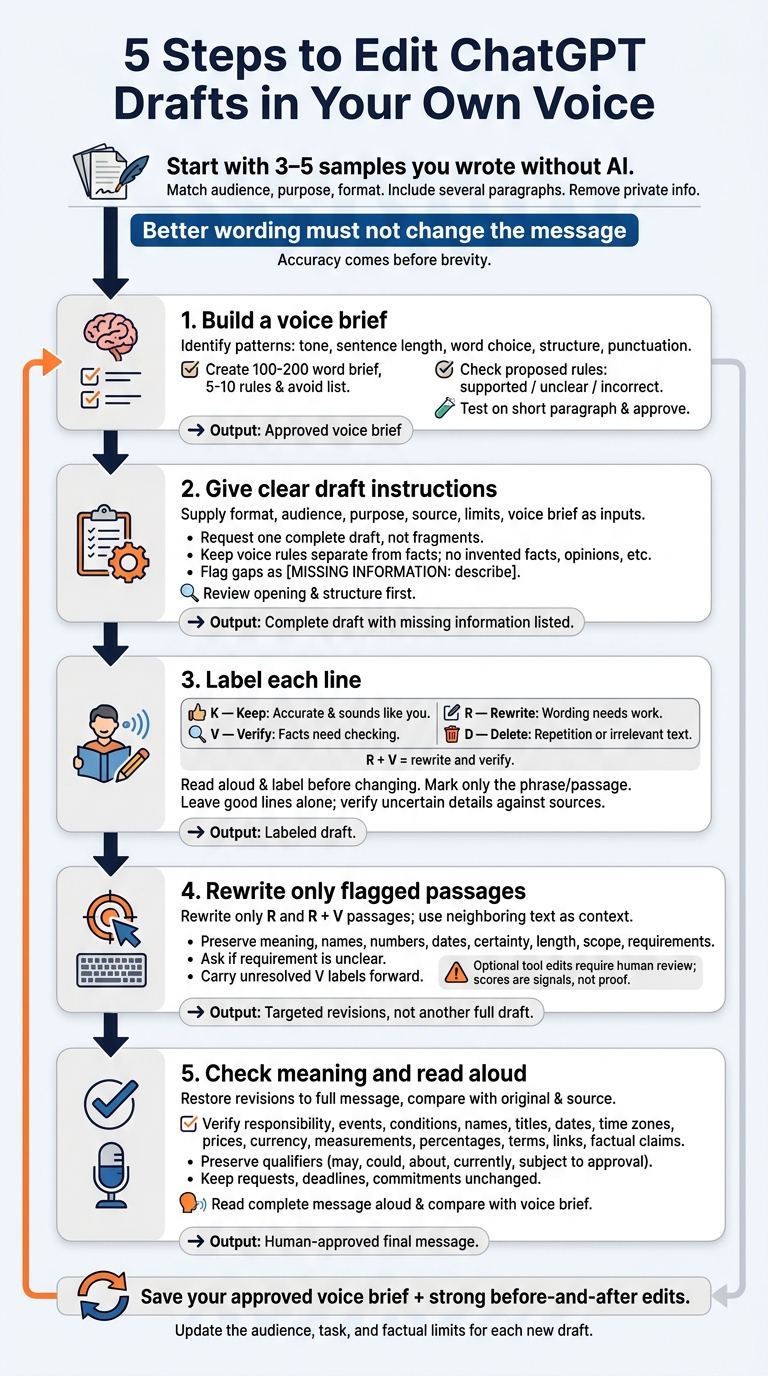
I make ChatGPT drafts sound like me by editing the wording - not changing the facts. I start with 3–5 samples of my own writing, then use these five steps:
- Build a voice brief. I turn patterns in my writing into clear rules for tone, sentence length, and word choice.
- Give clear draft instructions. I supply the audience, purpose, format, and facts, keeping voice rules separate.
- Label each line. I mark what to keep, rewrite, verify, or delete.
- Rewrite only flagged passages. I leave good lines alone and review any optional tool edits myself.
- Check meaning and read aloud. I confirm facts, dates, requests, and promises, then listen for wording I wouldn’t use. (If you're unsure, test your detection skills to see how well you spot AI writing.)
My rule: better wording must not change the message. I save my approved voice brief and useful edits so I can reuse them without starting over.
How to Get ChatGPT to Use Your Own Writing Style
Step 1: Build a Voice Brief From Your Writing
Choose 3 to 5 samples you wrote without AI for the same audience, purpose, and format as your draft. If you’re drafting an email, use professional emails - not essays or posts. Include several paragraphs from each sample.[2] These will serve as the source material for your voice brief.
Before sharing them, remove names, addresses, account details, private links, internal numbers, and unpublished material.[2][3]
Write Clear Voice Rules
Look for patterns in your word choice, sentence length, paragraph structure, punctuation, tone, and energy. Turn those patterns into a 100- to 200-word brief with 5 to 10 rules covering tone, contractions, paragraph length, detail, and promotional language.
Spell out how you open messages, which concrete verbs you favor, and how much context your readers need. Add a short avoid list of phrases you wouldn’t use.
Keep voice rules separate from facts so a change in style doesn’t change the meaning. Treat your preferences as defaults, not hard bans, and keep technical terms when they’re needed.
Ask ChatGPT to Analyze Your Samples
Label each sample by audience and format, then paste the samples below this prompt:
Analyze the writing samples below. Identify recurring tone, sentence structure, punctuation, and vocabulary patterns. Produce a short voice brief with specific writing rules and words or phrases to avoid. Do not draft yet.
Check each proposed rule against your samples and mark it supported, unclear, or incorrect. One unusually formal message shouldn’t define your everyday voice.
Revise the brief, test it on a short paragraph, and approve it yourself before using it for a full draft. Use the approved brief in Step 2 to draft the message.
Step 2: Draft With Clear Instructions
Give ChatGPT the full assignment in one prompt: who’s reading, what they need to know, and what they should do next. Ask for one complete draft, not fragments. That lets you review the message before polishing sentences. It’s a draft - not the finished piece. Check out our blog for more tips on writing with AI.
Keep Voice Rules Separate From Facts
Turn the approved voice brief into a full draft with the reusable prompt below. Replace the bracketed fields, then paste your approved brief under Voice brief. These rules guide tone only. They must not add facts, promises, or opinions.
### Format
[Email, post, or other format; target length; required sections]

### Audience
[Who will read this and what they already know]

### Purpose
[What the reader should understand or do after reading]

### Source material
[Paste approved facts, names, dates, figures, and qualifications]

### Factual limits
Preserve supplied facts and qualifications; do not invent personal experiences, opinions, results, or claims.
Flag missing information rather than filling gaps with assumptions.
Keep supplied numbers, dates, names, and commitments unchanged.
Mark necessary gaps as [MISSING INFORMATION: describe what is needed].

### Voice brief
[Paste your approved voice brief]

### Output
Return one complete draft with a clear opening, logical body,
and closing. Use only the supplied information.
List missing information separately after the draft.
If the length target leaves no room for a needed qualification, keep the qualification and flag the conflict. Accuracy comes before brevity. Use headings to keep instructions separate from source material.
Review the Opening and Structure
Start with the opening, then check the structure. Does the first line get to the point without generic enthusiasm or extra words?
Draft Edit Reason We are thrilled to announce an exciting update regarding your project timeline. Here’s an update on your project timeline. Removes generic enthusiasm and unnecessary wording without adding information.
Next, check the flow. Would this audience understand the purpose after the first two sentences? Are the facts in a logical order? Is the requested action clear, and does the closing fit the relationship? Fix the structure before editing individual sentences. Polished wording won’t fix the wrong message.
Step 3: Label Lines to Keep, Rewrite, Verify, or Delete
Read the draft aloud, sentence by sentence. Mark any line that feels awkward, unnatural, or unlike you. Reading aloud helps you catch rough transitions, run-on sentences, missing words, and uneven rhythm that silent reading can miss.[4][5] Label the lines before changing them instead of asking ChatGPT for another full draft. You're cleaning up the draft you have, not starting over.
Use K for accurate lines that sound like you, R for lines that need rewriting, V for facts to verify, and D for repetition or irrelevant text. Leave good lines alone. If one phrase needs work, mark that phrase - not the whole paragraph.
Spot Wording That Sounds Unlike You
Compare each flagged line with your voice brief and source samples. Watch for repeated transitions, sales-heavy language, abstract nouns, vague claims, and sentences that all follow the same rhythm. Formal wording isn't wrong. What matters is whether it fits your vocabulary, warmth, and sentence length. Rewrite a useful idea; delete a line that adds nothing.
Flag details from your notes that are missing, too. Restore them from the source material - not by asking ChatGPT to “make it more personal.” You don't need invented anecdotes, preferences, customer reactions, or opinions to sound natural.
Separate Style Edits From Fact Checks
Use R for wording issues and V for uncertainty about names, numbers, dates, quotations, features, or qualifications. Mark a line R + V if it needs both rewriting and verification. Check the original notes or an authoritative source before approving the wording.[6]
Keep the scope and level of certainty unchanged: a possibility must not become a promise. Carry unresolved V labels into the rewrite pass. In Step 4, use the labels to rewrite only the lines marked R.
Step 4: Rewrite Only Flagged Passages
Take the lines you marked R or R + V in Step 3. Give ChatGPT the flagged passage, enough surrounding text for context, your voice brief, and the intended meaning.
Rewrite only the text between BEGIN FLAG and END FLAG in my voice. Treat neighboring sentences as context only; leave them unchanged. Preserve meaning, names, numbers, dates, certainty, and length. Preserve scope and requirements. Do not add facts, examples, humor, slang, anecdotes, or stronger opinions. If a requirement is unclear, ask instead of guessing. Return the revision, a brief explanation, and any questions for me.
The explanation should describe what changed, not add a new interpretation.
Use Direct Verbs Without Adding Claims
Draft Edit Reason Your feedback will facilitate the implementation of revisions to the proposal. Your feedback will help us revise the proposal. Replaces noun-heavy wording with a clear action: “revise.”
Direct verbs make the message clearer without adding extra color. But check who’s doing the work: does “us” correctly identify who will revise the proposal? A shorter sentence isn't a safe edit if it assigns the work to the wrong person.
Review Optional Rewrites With UnslopAI
For an optional pass, paste the flagged passage into UnslopAI’s web app. Compare the diff with your voice brief, then check names, numbers, claims, and length. Treat slop scores as signals, not proof. Reject changes that flatten your phrasing, and carry any unresolved questions about meaning into Step 5.
Step 5: Check Meaning and Read Aloud
Once you’ve rewritten the flagged lines, paste the revisions into the full email. Then review the whole message, comparing each sentence with the original.
Verify Facts, Limits, and Requests
Check who’s responsible, what will happen, when, and under what conditions. Don’t trade meaning for smoother wording.
Verify names, titles, dates, time zones, prices, currency, measurements, percentages, product terms, links, and every factual claim against your source material - not just the draft. Keep qualifiers such as may, could, about, currently, and subject to approval. The recipient should still have the same action to take: a request must not become a demand, and an estimate must not become a commitment.
Read the surrounding sentences for unclear pronouns, repeated points, and abrupt tone changes. Check that the length fits the task. Then read the email aloud to check meaning, voice, and mechanics. Mark missing words, awkward transitions, and phrases that don’t sound natural. Compare the final email with the voice brief, too - not just the source text.
Compare the Complete Email Before and After
The table below compares the full email, from opening to closing. Read down each email column for the complete message, and across each row to check the edits.
Original Draft Final Edit Meaning Check Hi Maya, I wanted to follow up about the proposal timeline. We are hoping to share a revised version next week. Hi Maya, I’m following up on the proposal timeline. We’re hoping to share a revised version next week. The purpose and timeline remain. “Hoping” still signals an intention, not a promise. Could you take a look and give us your thoughts by Friday, June 14? Could you review it and share your thoughts by Friday, June 14? The proposal-feedback request and deadline stay unchanged. If that timing is difficult, please let me know and we can adjust. If that timing doesn’t work, please let me know and we can adjust. The option to adjust remains; the deadline has not become inflexible. Thanks, Jordan Thanks, Jordan The closing needs no edit.
If you used UnslopAI, compare its fidelity checks with the source text. Human review still decides meaning.
Conclusion: Save Your Voice Brief for Next Time
After you finish a draft, save the voice brief for the next one. Follow the same process each time: reuse the brief, edit only flagged lines, and check that the meaning hasn’t changed before sending.
Keep the approved brief alongside a few strong before-and-after passages. Note why each edit worked, and include enough context to guide future edits. Turn recurring corrections into clear rules. For each new draft, update the audience, task, and factual limits.
Leave the lines that already work alone. Each draft helps you edit the next one faster while keeping the writing closer to your voice.
FAQs
What if I don’t have enough writing samples?
Start with short pieces you’ve already written: emails, LinkedIn posts, or newsletter segments. Look at your sentence structure, vocabulary, and rhythm. Do you favor direct wording or more description? How long are your sentences?
Turn those patterns into instructions for UnslopAI. Then edit only the passages that sound stiff or unnatural until the draft sounds like you.
Should I use different voice briefs for different audiences?
Yes. Create separate, reusable goal sheets for customer emails, proposals, and newsletters [1]. Keep your core voice consistent, but adjust each sheet to reflect who’s reading, how much they know, and what they need to do [1].
Let your voice profile guide tone and rhythm. Then tailor the content, length, and priorities to each audience, so the writing sounds like you and meets the reader’s needs [1].
How can I spot subtle meaning changes in a rewrite?
Compare the rewrite with the original sentence by sentence. Check names, numbers, dates, claims, ownership, and the author’s judgments. Look for changes in emphasis or dropped qualifiers - for example, a possibility turning into a promise.
UnslopAI’s before-and-after diff view highlights additions and removals. Use automated fidelity checks to support manual review, not replace it. Verify critical details yourself before publication.