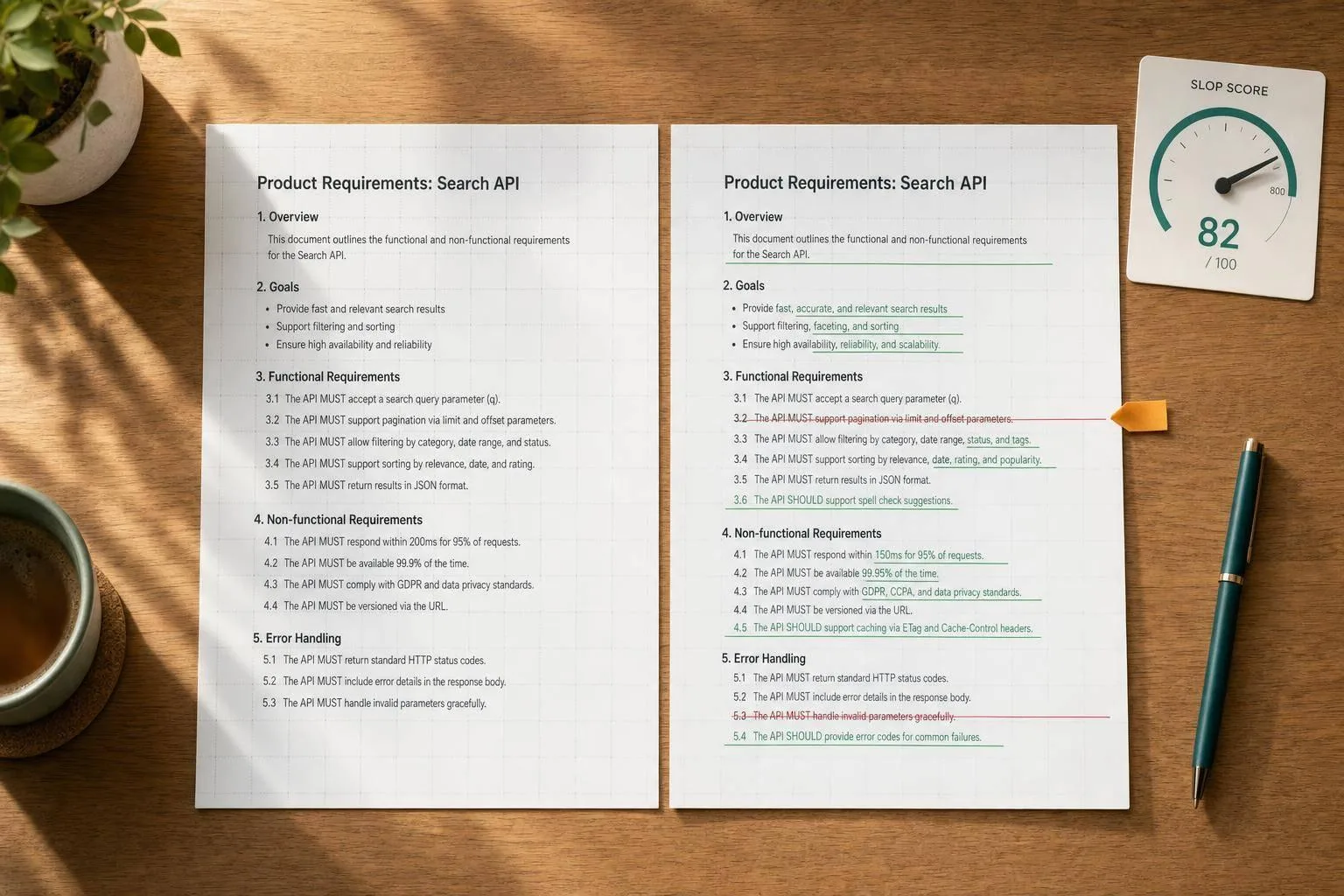
If you want AI cleanup you can check, don’t ask for edited text alone. I’d want 3 things every time: the rewrite, a machine-readable diff, and a score that shows how much generic AI phrasing was cut, or spot the AI yourself.
Here’s the short version:
- Run a check first to score the draft before changing anything
- Rewrite only when needed
- Return a stored result ID so I can pull the full record later
- Use a diff that both people and software can review
- Flag edits to names, dates, numbers, and claims
- Log only the minimum data needed for audit
- Treat the score as a sorting signal, not the final call
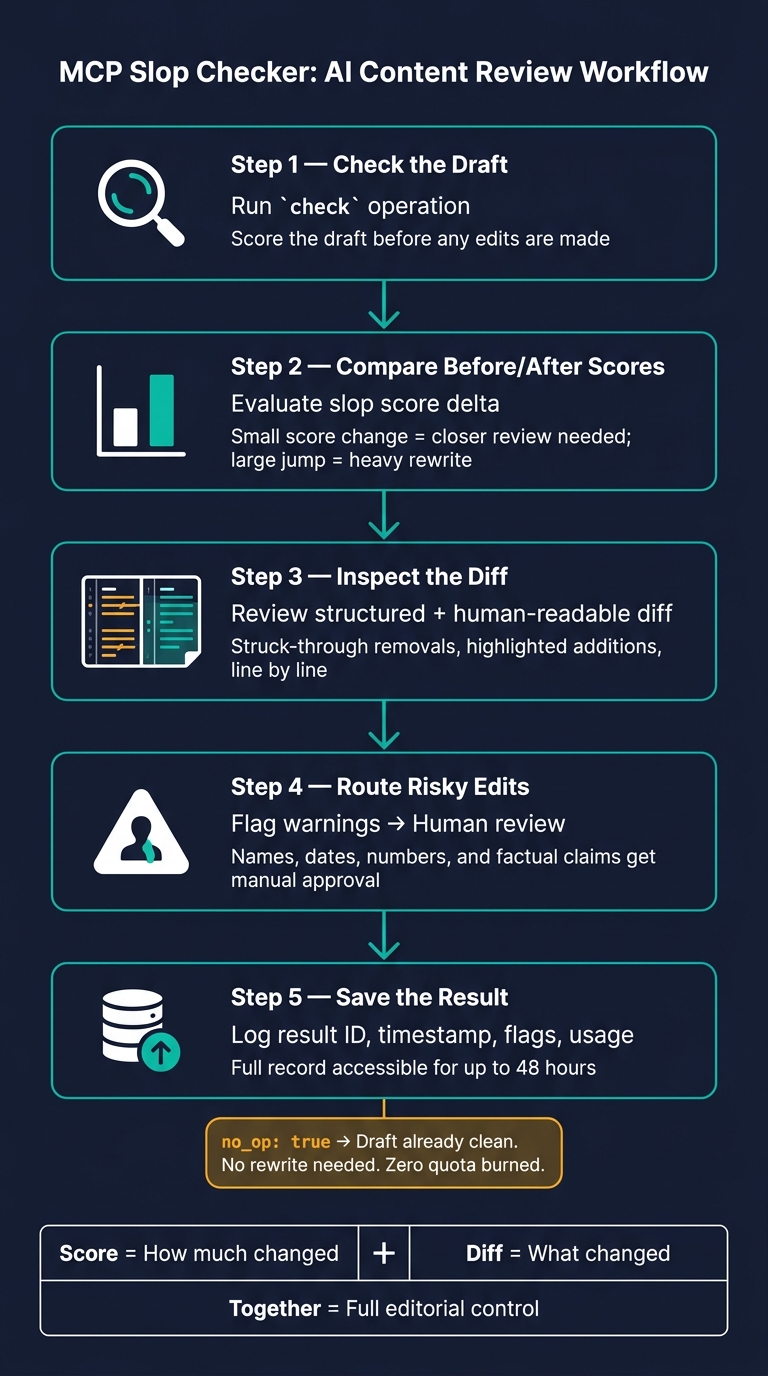
A setup like this gives me a simple review loop:
- Check the draft
- Compare before/after scores
- Inspect the diff
- Send risky edits to a person
- Save the result ID, timestamp, flags, and usage data
One detail matters more than it looks: the no-op flag. If no_op: true, the text was clean enough already, no rewrite was needed, and the run should not burn rewrite quota. That can cut waste by 100% for that draft.
I’d also keep the output shape fixed. That means every result should return fields like result_id, scores, diff, warnings, fidelity checks, and created_at. If the result is stored for up to 48 hours, I can reopen the full before-and-after record without digging through raw text logs.
Quick comparison
| Part | What I’d use it for | Why it matters |
|---|---|---|
check | Score a draft before editing | Helps me avoid edits I don’t need |
rewrite | Produce the revised text and diff | Gives me the text plus the audit trail |
get_result | Pull a past result by ID | Makes review and logging easier |
| Structured diff | Validation, routing, logs | Lets software read each change |
| Human-readable diff | Editor review | Lets me scan changes line by line |
warning flags | Names, numbers, facts | Sends risky edits to manual review |
no_op | Already-clean drafts | Saves quota and review time |
So the core idea is simple: a score tells me how much changed, and a diff tells me what changed. Put them together, and I have enough to review AI-edited text without guessing.
MCP In 26 Minutes (Model Context Protocol)
How to Set Up the MCP Checker for Consistent Retrieval
Consistent retrieval starts before the first API call. The choices you make up front - what fields are required, how operations are named, and which schema you enforce - shape the quality of every result after that. If you want runs you can compare and audit, use a fixed contract so each call returns the same fields.
Once the return payload is set, lock down the operation names and schema.
Define operations: check, rewrite, and get_result
In most cases, you only need three operations:
| Operation | What It Does | Key Inputs | Key Outputs |
|---|---|---|---|
check | Returns a slop score without editing the text | text, fidelity_rules | before_score, warnings |
rewrite | Rewrites the draft in a more natural tone | text, tone, protected_facts | revised_text, diff, after_score, id |
get_result | Retrieves a stored result - including its diff and scores - by unique ID | id or result_id | original_text, revised_text, diff, before_score, after_score, created_at |
Keep scoring separate from rewriting. Run check first. That way, a reviewer can decide whether a rewrite is worth doing before any text gets changed.
Set the input contract and fidelity rules
If retrieval is going to stay useful, the tool also needs to protect facts during rewriting. Send the full draft, the operation type, and protected facts like dollar amounts, dates, URLs, job titles, and brand terms. Use preserve_markdown to keep formatting intact while the engine edits only the prose [1].
Style instructions finish the contract. When you specify the audience and tone, the engine has enough context to make edits that fit the piece, instead of just cutting slop in a vacuum.
Use an output schema clients can validate
A stable schema is what makes a rewrite tool dependable inside a pipeline. Keep the focus on the fields that matter for retrieval and validation:
| Field | Description |
|---|---|
id / result_id | Unique identifier for the operation; available for audit access for up to 48 hours [1] |
fidelity_checks | Confirmation that protected facts survived the edit |
created_at | Timestamp of the stored result |
Store result_id so you can pull the full before-and-after record, compare versions, and build audit logs. That fixed shape is what later review steps use to compare before and after states.
How to Return Diffs and Scores That People and Systems Can Review
Once the result schema is set, return the score and diff in a format that both people and software can use.
Put the score, diff, and review flags in a single payload. That way, a person can check the result right away, and a client app can decide what to do next without extra parsing or follow-up calls.
A score by itself doesn't say much. It needs context. A status field like pass or fail, based on a configurable threshold, gives software clients a clean signal for routing. You should also include the engine version so teams can audit results later.
Here’s what a complete score object should include:
| Field | Type | Description |
|---|---|---|
score | Float | Percentage of AI-typical phrasing removed (e.g., 0.77 for 77%) |
scale | String | Score range, e.g., "0.0-1.0" |
direction | String | "higher_is_better" for a slop-removed metric |
version | String | Engine version used for the check |
confidence | Float | Confidence that the slop label is correct |
status | String | "pass" or "fail" based on your threshold |
no_op | Boolean | true if no changes were needed |
Choose a diff format for retrieval and validation
Not every diff format works for every job. Some are better for a fast human scan. Others are built for validation, logging, or workflow logic.
| Diff format | Best use | Limitation |
|---|---|---|
| Unified text diff | Quick human review in editors | Harder for apps to parse reliably |
| Token or character spans | Precise UI highlighting and inline annotations | Can be noisy for larger rewrites |
| Sentence-level changes | Editorial review of meaning and tone shifts | Less precise for small edits |
| Structured change objects | Validation, logging, automation, and downstream workflows | Requires a stricter schema and more implementation work |
For automation, use structured change objects. For human review, use a unified diff or sentence-level diff. That split keeps things simple: machines get a strict format, and reviewers get something they can read without squinting at raw JSON.
UnslopAI's before-and-after diff view uses struck-through text for removals and highlights for additions [3], which makes it easy to scan during review. Pick one machine-readable format for automation, then show a readable version for reviewers.
Mark risky edits for human review
Not all edits carry the same risk. A wording cleanup is one thing. A meaning shift is another.
Each change object in the diff should include a change_type field such as addition, deletion, replacement, or punctuation_change. This lets reviewers filter changes by risk level without reading every line.
Add a warning field for edits that touch names, numbers, or factual claims. In practice, change_type tells you what changed, and warning tells you what might need a closer look. That makes it much easier to separate safe rewrites from edits that could change meaning.
Route any change with warning to human review.
Use these fields to send clean edits forward and direct risky ones to human review.
Build a Review Flow for Drafts, Messages, and Team Work
Once you have the score, diff, and warning flags, the next step is human approval. Treat every MCP result as a proposed revision, not the final draft. Use the score and the diff to decide what stays and what goes.
Review before-and-after scores, then inspect the diff
Start by recording the pre-rewrite score and comparing it with the post-rewrite score. Small score changes deserve closer review than big ones. A bigger jump usually points to a heavier rewrite. That makes the score a triage signal, not an automatic green light.
After that, move to the diff. Read the struck-through removals and highlighted additions line by line. Pay close attention to anything that could change meaning, like dates, numbers, names, and commitments. If the interface supports selective acceptance, use it. Keep the edits that improve rhythm, and reject the ones that dull the writer's voice or swap a precise term for something more vague.
If the engine returns no_op: true, the draft is already clean enough. Move on without making changes, and it won't count against your quota [1].
Use fidelity checks for facts, tone, and intent
A better score doesn't always mean a better draft. Before you approve anything, verify dates, names, numbers, and commitments. Check that product names match the source exactly and that any stated metrics stay the same.
Tone and intent need review too. Ask a simple question: does the rewrite still sound like the writer? A cover letter should still show real interest in the role. An internal report should still feel direct and specific. If the rewrite sounds polished but generic, that's a sign of over-editing. In that case, reject the problem changes in the diff instead of rolling back the whole revision.
Apply the flow to common writing tasks
The same review loop works across formats, but the main risk shifts depending on the task:
| Content Type | Key Focus Area |
|---|---|
| Cold email | Collaboration and mutual value |
| LinkedIn post | Workflow and innovation tone |
| Blog opening | Voice and audience resonance |
| Cover letter | Clear role fit and measurable contribution |
| Internal report | Observability and technical clarity |
For short professional messages like emails and LinkedIn posts, the main job is cutting generic AI phrasing, such as "I hope this email finds you well" or "I'm thrilled to announce." In these cases, review tone first. Then decide whether the revised version still sounds like the sender.
For longer content like articles and newsletters, focus on every sentence that makes a factual claim. Longer diffs make it easier for fact changes to slip by unnoticed.
For internal business writing, the goal is often to remove corporate filler like "It is crucial to note" or "underscores the importance of" and replace it with plain, direct language. If the slop improvement is small, or if the diff touches meaning-sensitive content, send borderline edits to manual review.
Log Results, Measure Patterns, and Best Practices
Log the minimum data needed for audit and analysis
After review, log each result so your audit trail stays clear and team patterns don’t disappear into the void. For each result ID, store the fields you need to reopen the diff and check the score later. The goal is simple: keep enough detail to audit decisions and debug failures, without exposing sensitive draft content.
| Log Field | What to Capture |
|---|---|
id | Unique identifier for cross-referencing history |
| Timestamp (ISO 8601) | When the request was made |
slop score | before_score or after_score, depending on the operation |
no_op status | Whether the engine made any changes |
| Quota usage | Current quota state, such as used, quota, or period_ends_at |
| Change summary | Before-and-after changes for auditability |
| Fidelity flags | Whether the original meaning was preserved |
| Error code | Stable failure codes such as invalid_key, quota_exhausted, or engine_failed |
Do not log full draft text by default. UnslopAI's History keeps content accessible for 48 hours before it is purged [1]. If the content is sensitive, redact it or hash it before writing anything to your log store. Access to audit logs should also stay locked down with role-based controls.
You should also watch quota headers - X-Quota-Used, X-Quota-Limit, and X-Quota-Reset - or the usage object, so you can track consumption before quota runs out [1].
Track team metrics without over-trusting the score
As logs build up, turn them into team-level patterns. Start with a few simple rollups: score change, no-op rate, fidelity failures, and repeat diff patterns [2]. Those numbers can show where AI-polished writing tends to slip, but they shouldn’t be treated as the final word.
Think of the score as a sorting signal, not a ruling. The diff shows what changed, and the fidelity check helps you judge whether those changes stayed true to the source. No-op rate matters too. If that number starts climbing, it often means drafts are already fairly clean [1].
Conclusion: Use Retrieval as an Editing Control Layer
Retrieve diff and score together, validate the schema, flag risky edits, and log only the data needed for audit. A score alone tells you how much changed. A diff alone tells you what changed. Put them together, and you have enough context to make an editorial call.
The workflow is pretty straightforward: define clear operations, validate structured outputs against a schema, return both diff and score, flag meaning-sensitive edits for human review, and log results with the smallest useful set of fields for audit. UnslopAI follows this pattern with diffs, scores, fidelity checks, and API access that fits into a review loop instead of trying to replace it.
That setup works for solo writers and for teams cleaning AI-assisted drafts at scale. The retrieval layer doesn’t make the decision for you. It gives your team the evidence needed to make one.
FAQs
When should I skip a rewrite?
Skip the rewrite if the UnslopAI engine returns a no-op status. That means it checked your text and found nothing to fix, so your draft already reads like natural, human writing.
No-ops don't count toward your monthly quota. So you can still run drafts through the checker to confirm quality without using credits.
What should a good result payload include?
A good result payload should include the rewritten text, a rewrite ID for tracking, and a true/false flag that shows whether the text changed.
It should also return usage details, like credits used and remaining quota. That makes it easier to audit results and plug them into your current workflow without extra guesswork.
How should teams review risky edits?
Use UnslopAI’s auditing features to review risky edits.
Start with the slop score. It gives you a quick read on how much machine-typical phrasing was cut from the draft.
Then look at the before-and-after diffs. Removed text appears struck through, and revised text is highlighted. That makes it easier for teams to check that the draft sounds more human while keeping the original factual meaning intact.