
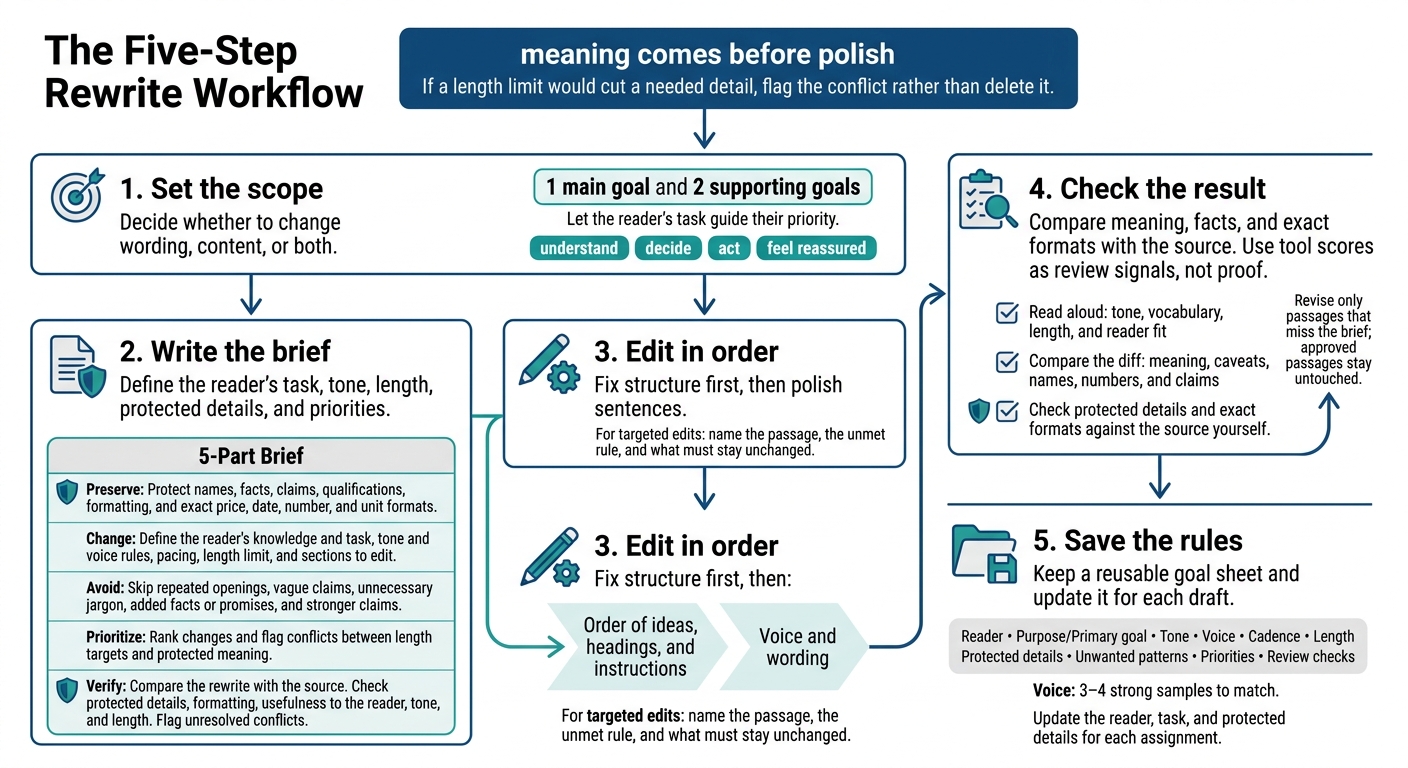
Before I rewrite an AI draft, I choose 1 main goal and 2 supporting goals - and mark what must stay unchanged. That gives me a clear test for each edit: does it help the reader without changing the message? This is the key to making it harder to spot the AI in your writing.
My process is simple:
- Set the scope: Decide whether to change wording, content, or both.
- Write the brief: Define the reader’s task, tone, length, protected details, and priorities.
- Edit in order: Fix structure first, then polish sentences.
- Check the result: Compare meaning, facts, and exact formats with the source. Use tool scores as review signals, not proof.
- Save the rules: Keep a reusable goal sheet and update it for each draft.
My rule: meaning comes before polish. If a length limit would cut a needed detail, I flag the conflict rather than delete it.
I Created These Prompts to Make AI Write Like Me, (Not Generic AI)
Define Your Rewrite Goals
With the edit scope set, or your API rewrite engine configured, pick one primary rewrite goal and two supporting goals. Let the reader’s task guide their priority. If the draft needs to drive action, make the next step clear. When goals clash, favor the one that best serves that task.
Decide how the rewrite should sound, how much it should say, and what readers need from it.
Set Tone and Voice Rules
Tone is the attitude; voice is the consistent writing style. Replace vague guidance with clear rules: name the tone and specify which writing habits to avoid. Then set targets for length and sentence rhythm.
Set Pacing and Length Targets
Choose a word, character, or paragraph limit. Specify what to trim or expand, whether that’s repeated explanations, background details, or instructions. When cutting, preserve names, dates, prices, and claims. Length is a limit - not a reason to sacrifice clarity or key information. Match the depth to what readers already know.
Write for the Reader’s Knowledge and Task
State the reader’s starting knowledge and what they need to do: understand, decide, act, or feel reassured. Use both to guide how much explanation the rewrite needs.
Write a Rewrite Brief
Turn your tone, length, and reader-fit goals into clear editing rules. Spell out what can change, what must stay fixed, and which goal takes priority when instructions conflict.
Use a 5-Part Brief Template
Copy these five fields and fill them in before you edit.
| Field | Instructions to include |
|---|---|
| Preserve | Protect names, facts, claims, qualifications, formatting, and exact price, date, number, and unit formats. |
| Change | Define the reader’s knowledge and task, tone and voice rules, pacing, length limit, and sections to edit. |
| Avoid | Skip repeated openings, vague claims, unnecessary jargon, added facts or promises, and stronger claims. |
| Prioritize | Rank changes and flag conflicts between length targets and protected meaning. |
| Verify | Compare the rewrite with the source. Check protected details, formatting, usefulness to the reader, tone, and length. Flag unresolved conflicts. |
Use the completed brief to reorder the draft before polishing individual sentences.
Edit Structure Before Style
Start with the order of ideas, headings, and instructions. Then refine the voice and wording.
When requesting a targeted edit, name the passage, explain which instruction it doesn’t meet, and specify the text that must stay unchanged.
Review Changes With UnslopAI
UnslopAI is a web app that rewrites AI-polished drafts while preserving meaning. It offers before-and-after diffs, slop scoring, and fidelity checks. Use the diff to check the rewrite against all five brief fields: Preserve, Change, Avoid, Prioritize, and Verify.
Treat scores as review signals, not acceptance criteria. Chasing a perfect score can make the writing sound less natural. Fidelity checks help protect names, numbers, and claims; a failed check triggers a safer version. Still, check protected details and exact formats against the source yourself, and count the final words or characters.
For the next review pass, use the brief as your checklist and compare the rewrite against its instructions - not just the source text.
Check the Rewrite Against Your Goals
Before you accept the rewrite, give it one last check. Use your brief as the pass/fail test.
Check Style, Length, and Reader Fit
Read the rewrite aloud. Check that the tone and vocabulary match the brief and that the length fits your target.
Read it from the reader’s starting point, too. Does it suit their knowledge level and task? Is the next step clear? Trim only what you can remove without losing needed information.
Once style and length are checked, look for edits that may have changed the meaning.
Verify Meaning and Protected Details
Compare the rewrite with the original in a diff view. Look for shifts in meaning, missing caveats, and altered facts. Check names, numbers, and claims closely. Watch for “safe” wording that removes nuance or the author’s perspective. Style scores don’t prove factual accuracy.
Approved passages stay untouched. Revise only those that miss the brief. Identify the passage, the rule it misses, and the planned fix. Explicitly exclude approved passages from the next edit.
If the length target conflicts with a needed qualification, flag that conflict instead of quietly cutting the qualification. If a tool makes no change, treat that as a sign that the passage already meets your quality standards.
Conclusion: Save a Reusable Goal Sheet
After your final check, save the rules that helped the rewrite work. Keep this compact worksheet with your draft:
- Reader: Their knowledge, situation, and immediate task.
- Purpose/Primary goal: What the piece should help them do.
- Tone: The mood the draft should create.
- Voice: 3–4 strong samples to match.
- Cadence: The sentence rhythm.
- Length: The word or character limit.
- Protected details: Names, factual claims, numbers, dates, prices, and technical specs.
- Unwanted patterns: Clichés and habits to remove.
- Priorities: Meaning before polish.
- Review checks: Read aloud, compare the diff, and run fidelity checks.
Use the sheet for every new draft, with separate versions for customer emails, proposals, and newsletters. Update the reader, task, and protected details for each assignment. Turn repeated corrections into voice rules.
Example: remove transitions that only announce the next point.
FAQs
How do I turn vague rewrite goals into measurable rules?
Treat metrics as clues, not verdicts. Use burstiness to spot sentence lengths that are too uniform. Check sentence variety for repeated structures, openings, or transitions. Then set a clear goal, like cutting filler phrases or smoothing out a robotic rhythm.
Use UnslopAI for a focused rewrite. Review the before-and-after diff to see whether the changes fit your voice, then check that all names, numbers, and claims are still accurate.
How can I improve cadence without losing my voice?
Read your draft out loud to spot repetitive rhythms. Mix short, punchy sentences with longer ones that connect your ideas. Cut filler. Break up paragraphs that drag, or rearrange clauses without changing your perspective or tone.
UnslopAI can help rework robotic phrasing and repetitive rhythms so your writing sounds more human while keeping your original meaning and voice.
How do I spot subtle meaning changes in a rewrite?
A smoother rewrite isn’t proof of accuracy. Compare the before-and-after diff for additions, deletions, or wording changes involving names, numbers, dates, and claims. Look for shifts in emphasis, and verify the facts.
Then run a fidelity check. UnslopAI rewrites pass only when they preserve meaning and stay close to the original length. Review both the diff and the score to confirm that nothing important changed [1][2].